Add a mail account
Add your first account, or another one, by signing in through your browser or with your address and password.
The first time Inbox Classic starts, it opens Add Mail Account. To add another account later, choose File > New Account.
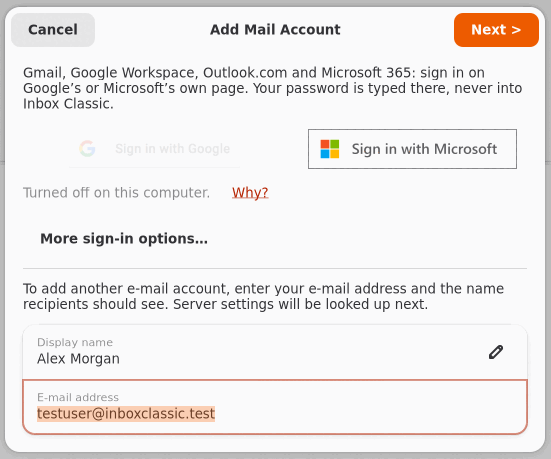
Gmail, Google Workspace, Outlook.com or Microsoft 365
To add the account through your browser:
- Click Sign in with Google or Sign in with Microsoft. Your web browser opens the provider’s sign-in page.
- Sign in there, then come back to Inbox Classic. The account is added and its mail starts to arrive.
A faded button is turned off on this computer. Click Why? under it to see the reason.
Other IMAP and SMTP accounts
To add the account with its password:
- Type your name as others should see it in Display name.
- Type your address in E-mail address.
- Click Next >. Inbox Classic looks up your provider’s settings, which may take a few seconds. Cancel stops the lookup. On Windows and Linux, setup continues with manual settings; on Mac, it cancels adding the account.
- Type your password in Password.
- Check the server settings, then click Finish. Inbox Classic signs in and downloads your folders.
If your provider wants an app password instead of your usual one, Inbox Classic says so and offers to open the provider’s instructions.
Account name is what the folder list calls the account, such as Work. A new account starts with its provider’s name or its domain. You can change it any time in the account’s properties.
To sign in with a sign-in app of your own, click More sign-in options on the first page and choose it.