When an agent sends mail
Every message an AI agent wants to send is shown to you first, and waits in the Outbox before it goes.
An agent can send mail only if you allowed it to, and each message only after you say yes.
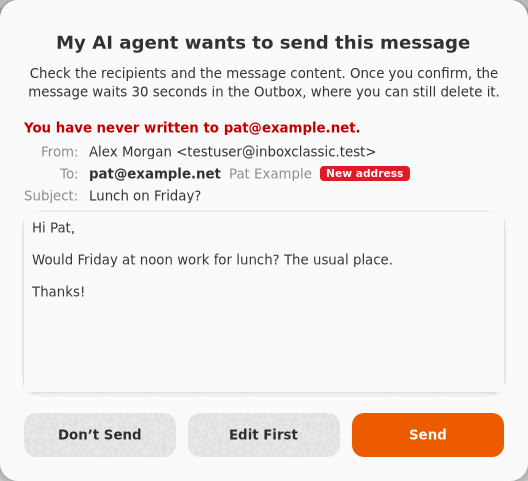
When the agent wants to send, Inbox Classic shows the message with every recipient by address. Addresses you have never written to are marked New address.
- Read the recipients and the text.
- Choose one:
- Send queues it for sending. The button becomes available after a short delay to reduce accidental confirmation.
- Edit First opens it in a new message for you to change.
- Don’t Send, the default, does not send it.
An agent asks about one message at a time. If you take a while to answer, the agent is told that the message waits for you, and it can ask later what you decided. By default, the messages and drafts it writes end with your signature, as yours do, but the agent can leave it out.
An approved message waits 30 seconds in the Outbox before sending is attempted. Its log records queuing, not delivery. While it remains there, even after 30 seconds, you can delete it there, or click Undo in Tools > AI Agents.
Answers to invitations
An agent that may send mail can accept, tentatively accept or decline a calendar invitation for you, through the same question. Above the text, the question says which invitation the message answers and when the event is. Inbox Classic writes the answer to the organizer from the invitation itself, so the message cannot be opened to change first. Each answer needs your approval and has no account signature text. Your local answer changes after the mail server accepts it, without confirmation from the organizer’s calendar.
Drafts an agent writes
When you open a draft an agent wrote, a line above the message names the agent. Check the recipients and the text before you send it.
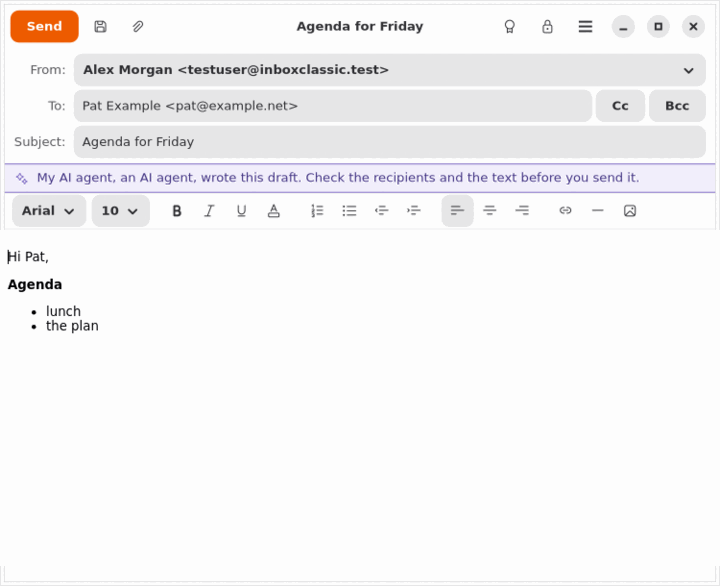
The agent can change or remove its draft until you save it in the editor, including automatic saving. From then on, the draft is yours.