Messages that were not delivered
When Inbox Classic recognizes a delivery failure or delay notice, it explains the reported reason and what you can do.
A delivery notice has an undelivered mark in the message list. When you open it, a card above it says whether your message was not delivered or is only delayed.
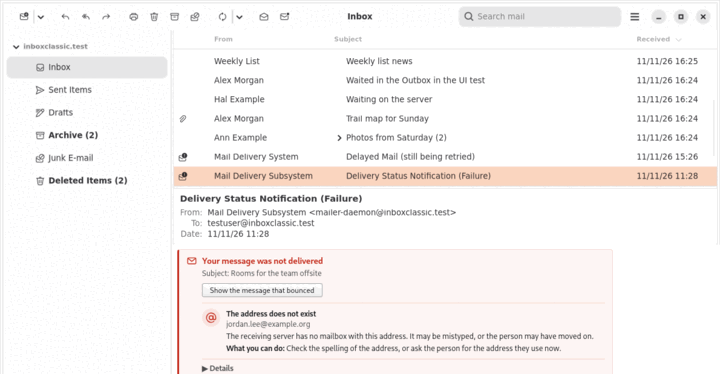
The card lists each recipient with the reason in plain words and what you can do. Details shows the receiving server’s own words.
- Show the message that bounced selects the original message if it can be found in the account.
- For a delay, Show the delayed message selects the original message if available. The notice reports that delivery is still being tried; wait for the outcome before sending again.
Some common reasons and advice for a final failure. If delivery is only delayed, wait for the outcome before sending again:
| The card says | What to do |
|---|---|
| The address does not exist | Check the spelling of the address, or ask the person for the one they use now. |
| The mailbox is full | Reach the person another way and ask them to make space before you try again. |
| Refused as spam | Check the server’s explanation. If it rejected the content, revise the message before trying again. |
| Your mail server is on a blocklist | Forward the notice to your mail provider. The sending server’s address was reported as blocked. |
| Held back for a moment | The receiving server asked for a later attempt. A delay notice does not guarantee when delivery will succeed. |
To find every delivery notice, search for is:bounce. The notice is analyzed on your computer; its contents are not sent to a separate analysis service.